Skip to main content

Open delegated mailboxes (Webmail)

On this page you can find out how to open delegated mailboxes via webmail (OWA).

ZIMT Logo

Instructions

Login


To open a delegated mailbox or a shared mailbox via Webmail, first log in to Webmail with the account to which the mailbox to be opened is delegated.

https://mail.uni-siegen.de


Open account


Now click on the account icon in the top right-hand corner of the page and select the option"Open another mailbox...".
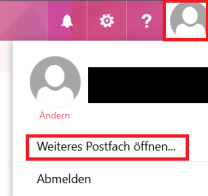
OWA Postfach mit markiertem Button für Konto und markierter Option "Weiteres Postfach öffnen..."

In the next step, enter the e-mail address of the delegated mailbox or shared mailbox and select the corresponding account.
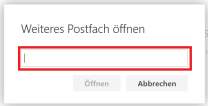
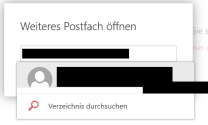
OWA Fenster für weiteres Postfach mit hervorgehobenem Feld zur Eingabe der Mailadresse des Postfachs
OWA Fenster für weiteres Postfach mit hervorgehobenem Feld zum Einfügen der Mailadresse des Postfachs und Postfachvorschlag

In the last step, confirm with"Open". The mailbox will now open in a new tab.
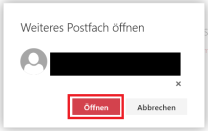
OWA Feld zum Hinzufügen des gewählten Postfachs mit Mailadresse des Postfachs und markiertem "Öffnen" Button
close up employee using microphone

ZIMT Support Desk

Die zentrale Anlaufstelle für die Inanspruchnahme der Dienste des ZIMT.