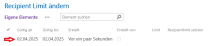
Change recipient limit
On this page you can find out how to increase the so-called "Recipient Limit" for sending circular mails.

Instructions
Information
Please note that circular e-mails that are to be sent to the entire university (all students and/or staff) must first be approved by the Rectorate.
When specifying the recipients, please note that e-mail distribution lists count as one (1) recipient.
The recipient limit can be increased to a maximum of one thousand (1000) recipients per e-mail.
To increase your recipient limit, log in with the account for which the limit is to be increased using the following link:
https://selfservice.zimt.uni-siegen.de/Lists/RecipientLimit
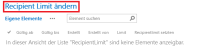
On the next page, click on the Change recipient limit button.
Then set the number of recipients and assign a time period for which the limit should be increased. Apply your setting by clicking on the Save button. The recipient limit can be increased to a maximum of 1000.
As soon as the change has been accepted, you will receive an e-mail to the corresponding account. Make sure that this is a confirmation and not an error message; you can view your setting under My Items. As soon as the period has expired, you will receive another e-mail.