
Create release
Files and directories are shared via the sciebo web application. To do this, log in to sciebovia your browser with your user name +@uni-siegen.de (e.g. g123456@uni-siegen.de).
via your browser.
Now select the directory to be shared and click on the share symbol to the right of it.

Now enter the user names of the persons for whom the directory is to be shared.
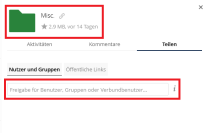
The directory should now be displayed for the relevant person.
It isimportant that the person for whom a directory has been shared is already registered with sciebo and has logged in there before!
