Booking licenses
On this page you will learn how to book software licenses with the identity management system.

Instructions
Identity Management System
To book the license for the desired software, first log in to the Identity Management System IDABUS. Please note, that IDABUS is only available when you are either logged into the university WiFi or using a VPN connection.
Booking
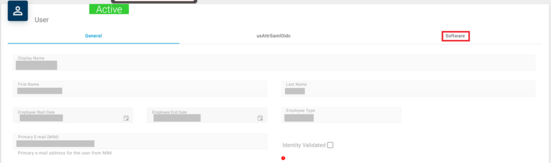
After having successfully logged into the user account management, you will be directed to a page displaying the general information regarding your account. Here, you can find three categories. To book a license, select the category "Software".
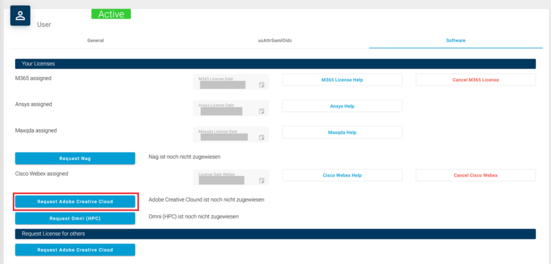
You can now select the license you want to book by clicking on the Button "Request [License]". If you have previously already booked a license, there will be two buttons instead. One to cancel your license and another labeled "[License] Help".
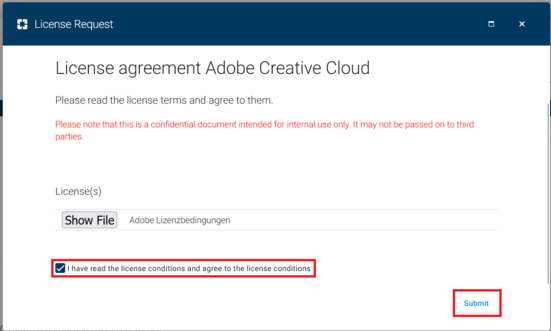
You must now agree to the license terms. To do this, check the box next to "I have read the license terms and agree to the license conditions" and confirm with "Submit".
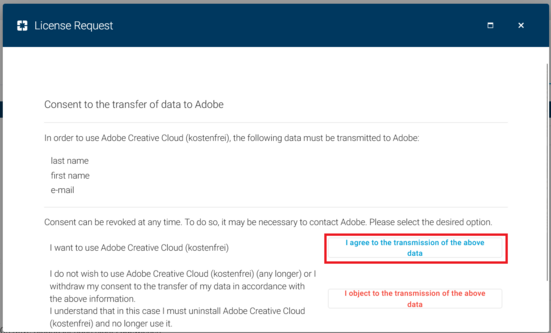
Lastly, you must confirm the transmission of your data so the booking can go through. Click on the Button "I agree to the transmission of the above data" to do so.
You will then receive a new overview of your information. After successful booking, it will take some time for the data to be fully transmitted.
In the case of Adobe and Webex, you will receive an e-mail after a short time. In the case of Office, the transfer can take up to two hours, after which you should be able to log in at https://portal.office.com/account
Please note, that you only get a confirmation mail upon the first time booking a license. If you renew a license you will not receive an e-mail.
