GetFTR - The Fast Way to Full Text

GetFTR is a browser extension that helps you find and access full-text academic articles. It checks in real time whether you can access an article through the University of Siegen. To do this, GetFTR uses the DOI—a unique identifier for academic publications.
The service streamlines the process from searching for to accessing scholarly articles. This means you no longer have to click on a full-text link at random without knowing whether you actually have access.
GetFTR shows you which current and relevant research results you can access through the University Library’s licenses. To take advantage of GetFTR links as well as information on retractions and errata on any website that uses DOIs, we recommend downloading the GetFTR browser extension.
Installation
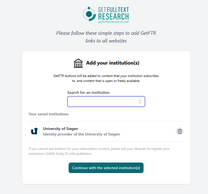
Click the link below to go directly to the download page for the GetFTR browser extension for your favorite browser (choose from Chrome, Edge, or Firefox).
When you log in, simply select "University of Siegen" once, and GetFTR will be activated.
How It Works
GetFTR verifies access rights directly with the publisher. This allows links to content to be displayed on websites or in search engines when the full text is available under the license agreements between the Siegen University Library and the respective publisher. In addition, links to open-access or free content are provided (including open-access and free articles in hybrid journals, even without a subscription, since the verification is performed at the DOI level rather than at the issue level).
This gives you access to the licensed content of the Siegen University Library even without using “Katalog plus”; the links may appear on various websites, in databases, other library catalogs, or AI services, provided that the bibliographic record contains a DOI (Digital Object Identifier) is included in the bibliographic record.
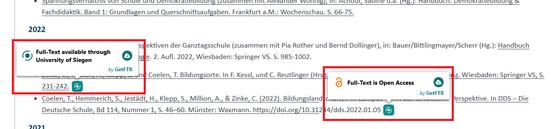
Example of GetFTR icons or links in a publication list:
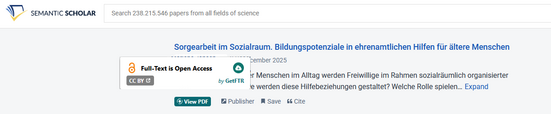
Example of a link to the full text in Semantic Scholar:
FAQs: GetFTR - Get Full Text Research
GetFTR helps you find the full text of academic articles more quickly. When you come across a title during an online search or in a database (e.g., in search results or a reference list), GetFTR takes care of the next step for you: It checks whether the full text of the article is available to the University of Siegen—either through the university’s subscription or via Open Access—and then directly displays relevant links for accessing the full text.
This saves you time, eliminates the need for lengthy searches for access options, and gets you to the texts you need for your studies or research more quickly.

With a single click, the PDF document opens in the browser or is downloaded (depending on the settings). If the computer is not connected to the University of Siegen’s network, you must first complete Shibboleth authentication or establish a VPN connection.
The PDF document usually comes directly from the publisher.

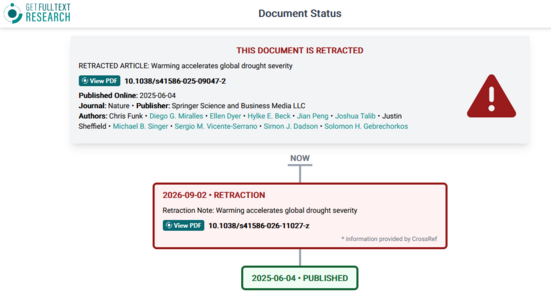
The exclamation mark indicates that the document has either been updated or retracted. Additional information is available when you hover over or click the icon. This information comes from Crossref and Retraction Watch, so details about retractions and corrections are displayed directly in the search results
. With a single click, you can easily view the complete history of updates and retractions in the form of a timeline.
GetFTR marks articles that have been updated or retracted with a special icon. You can get more information by hovering over or clicking the icon. This information comes from Crossref and RetractionWatch.com, so details about retractions and corrections are displayed directly in the search results
. With a single click, you can easily view the complete history of updates and retractions in the form of a timeline.

Clicking the icon takes you to a warning page that contains important information about the article’s retraction.
If GEtFTR does not display a link, it is usually because there is no unique identifier for the result (for example, you may not have a DOI for articles and/or an eISBN for books). You may find a DOI or eISBN in the full view of the result (if one is available), or at least other unique identifiers such as an ISBN, ISSN, or DOI-like strings (often the DOI or eISBN is missing only in the source, not in the work itself).
Searching by author, title, or other source details in Katalog plus often yields the desired result as well.
Our tips for searching in Katalog plus can help with this.
Anyone can install GetFTR as a browser extension and select the University of Siegen as their home institution. However, access to full-text articles is only available from workstations within the university network. Members of the University of Siegen can also access the electronic resources from off-campus by establishing a VPN connection or logging in via Shibboleth.
The login credentials of library users who are not university affiliates cannot be used to access licensed resources.
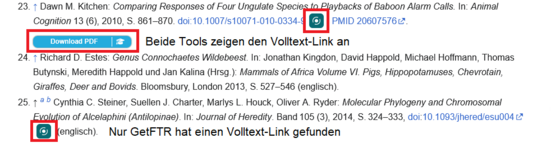
In principle, both browser extensions do the same thing: they use an icon to indicate when full text is available.
GetFTR can display the icons on many websites and publisher platforms, while Libkey Nomad offers specialized integrations on various sites that we at the University Library can customize editorially; GetFTR, on the other hand, can also be displayed in third-party discovery systems or catalogs.
Thus, both products have their advantages. It makes perfect sense to install both browser extensions. Sometimes you’ll see both icons next to a literature citation on a website; other times, only one. Both products are undergoing continuous development.