


Tips for searching the Katalog plus
The Katalog plus is the central search tool of the University Library of Siegen. Here you will find all media acquired by the library, as well as numerous licensed and open-access e-resources such as journal articles, e-books, and database content.
The "Catalog" tab lists all media in the Siegen University Library's collection. It includes various types of media, such as books, e-books, journals, e-journals, DVDs, and more.
At the same time, you can also search for articles - preferably with full-text access. To do so, select the "Articles and More" tab.
Call up the Katalog plus and enter known words from the book title or the author's name.
The author's surname and one or two meaningful words from the book title are usually sufficient.
Example: You are looking for the book "Eine musikalische Geschichte der Menschheit" by Michael Spitzer. Munich, Riva 2021.
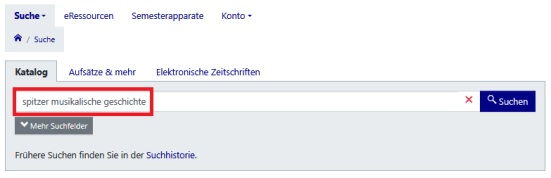
You do not need to pay attention to upper and lower case.
Umlauts are also found in expanded form and as a basic vowel.
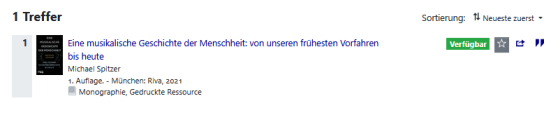
Information about the loan status of the book is already displayed in the hit list:

|
means that the book is on location and can be used or borrowed from the library. Books that are in a semester reserve are also considered available, as they can be used in the library. |

|
means that the book is on loan. It can be reserved by you, unless it is in the work folder of a member of university staff. |

|
means that the book is not available for use at the moment. Please contact one of the circulation desks. |
eBooks do not have an information button next to the title.
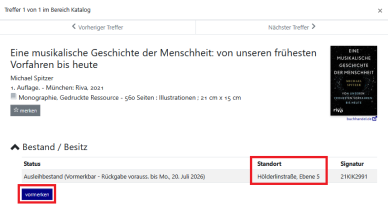
Clicking on the title will take you to the full display, where you can see further information about the location and signature of the book. If it is on loan, you may also be able to reserve it.
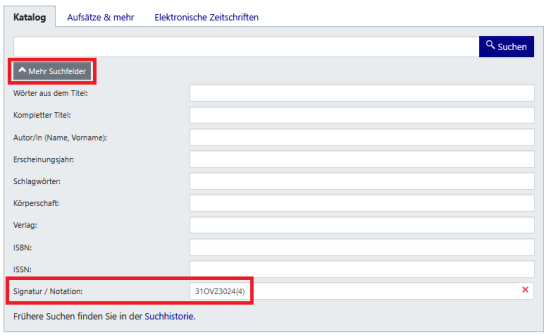
If you already know the shelfmark of a book, e.g. from a reference list, but do not know where to find it in the library, use the search field "shelfmark/classmark" from the advanced search ("More search fields").
Clicking on the title will take you to the full display where you can see more information about the location and shelfmark/call number of the book. If it is on loan, you may also be able to reserve it.
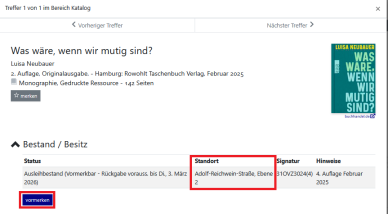
If you are looking for a specific magazine or newspaper and want to know whether a particular year is available in the library, you can proceed as follows:
Enter one or more words from the magazine or newspaper title in the search field.
- You do not need to pay attention to upper and lower case.
- Only enter meaningful words from the title and leave out articles, prepositions or similar
- Umlauts are also found in expanded form
Example search: "Journal of modern European history"
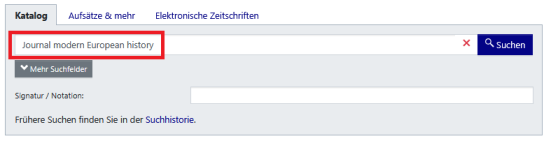
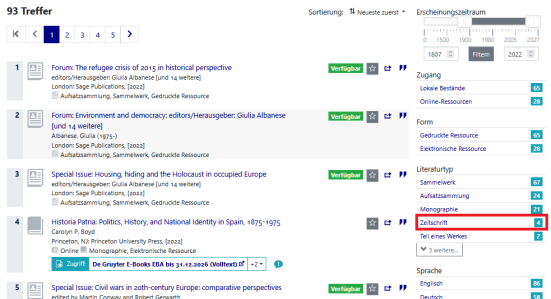
Via the "Catalogue" tab, you will receive the hits from the holdings of Siegen University Library. If the number of hits is too high, use a suitable filter, e.g. literature type: "Journals".
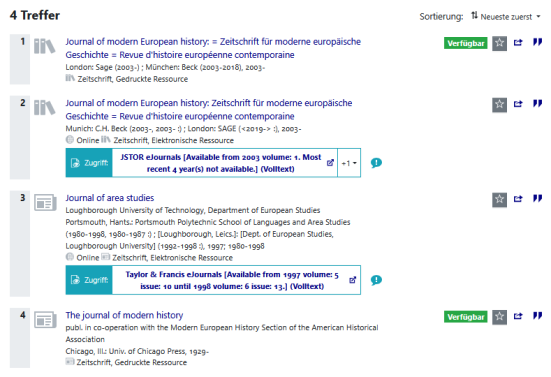
From the significantly smaller number of hits, you can see whether it is a printed or electronic edition and select the required title.
You can also use the "Electronic journals" tab or the subject overviews and search function in the"eResources" section to search for specific electronic journals. The listed journals are also accessible via the Electronic journals library - EZB
Please note that only electronically published academic journals are listed in the overviews.
In the "Electronic journals" tab, you must use the "How to access" button to find out whether a journal is accessible or can be ordered via interlibrary loan.
In the overviews of the eResources and the Electronic journals library EZB, freely accessible journals are marked with a green dot and licensed journals with a yellow dot.
Journals for which there is no access to the full texts at the University of Siegen (red dot) are also listed; tables of contents or abstracts are often available.
If you are looking for an essay or a chapter from a book, you can only search in the "Catalogue" section using the book title and/or author or, if known, the ISBN. (see also Tips for searching for books).
Example search:
Hirschheim, Rudy A.: Big Data, Little Understanding, In: Cambridge Handbook of Qualitative Digital Research 2023
Here you only know the book title with which you can search: Cambridge Handbook of Qualitative Digital Research
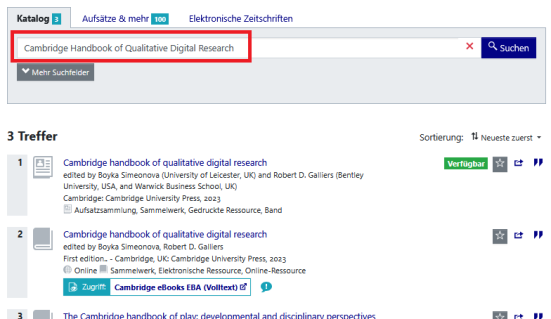
Alternatively, you can search with the author and the title of the chapter in the "Articles and more" section. This is also useful if you are unsure whether you know the correct title of the book.
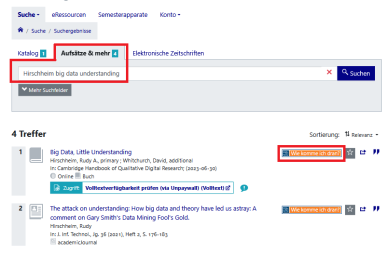
The hits you get here may contain a link to the article/full text, but call numbers are never displayed here.
To find out how to access the result, click the "How do I get it?" link (in the list of short titles or the full view).
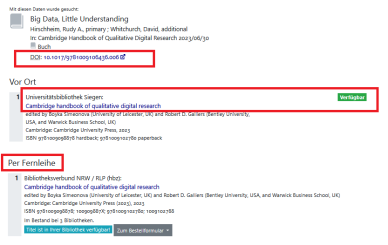
In the overview below, you'll find links to an online version as well as information on the availability of a print copy at the University Library of Siegen.
If neither is available, you can also start an interlibrary loan request directly here.
If you are looking for an article that has appeared in a journal, you can only search in the "Catalogue" section using the journal title or, if known, the ISSN. (see also Tips for searching journals).
Example search:
Jan Boelmann, Lisa König: 'Once upon a time there was a new world...' Fairy tale narratives in virtual realities" In: Information on German Didactics, Vol. 44 (2020), Issue 3, pp. 65-76
It is better to find the journal title "Informationen zur Deutschdidaktik" via the function "more search fields" > "complete title", as the two search terms "Informationen" "Deutschdidaktik" are expected to produce a large number of hits.
In addition, you should optimize the number of hits with the search filter literature type: "Journal".
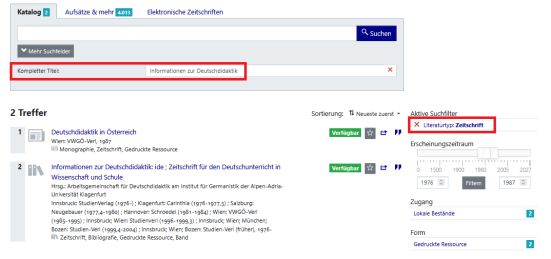
You can then select the correct title from the list of hits to find out the shelfmark or receive a link to an online edition.
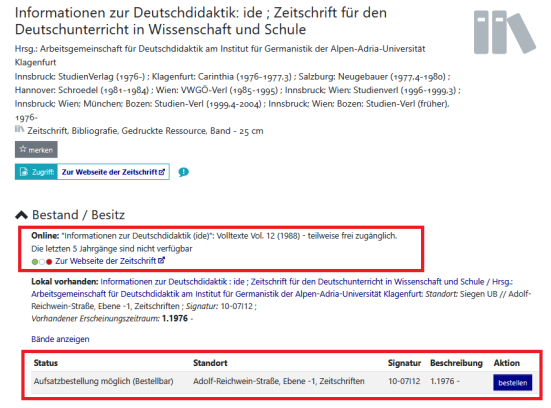
Alternatively, you can search using the author and the title of the article in the "Articles and more" section. This is also useful if you are unsure whether you know the correct title of the journal.
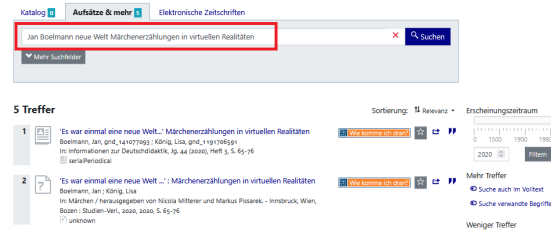
The hits you get here may contain a link to the article/full text, but call numbers are never displayed here.
To find out how to access the result, click the "How do I get it?" link (in the list of short titles or the full view).
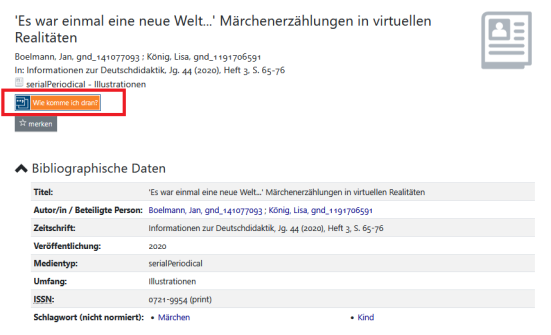
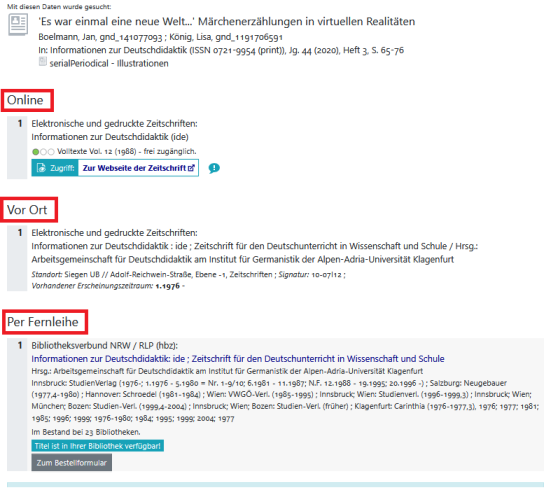
In the overview below, you'll find links to an online version as well as information on the availability of a print copy at the University Library of Siegen.
If neither is available, you can also start an interlibrary loan request directly here.
The menu item "Courses" in the catalog plus offers a list of the semester apparatus of the University of Siegen with their media.
In the search field you can enter terms from the title of the semester apparatus or names of lecturers.
Various filters are available on the right-hand side of the screen for further filtering.
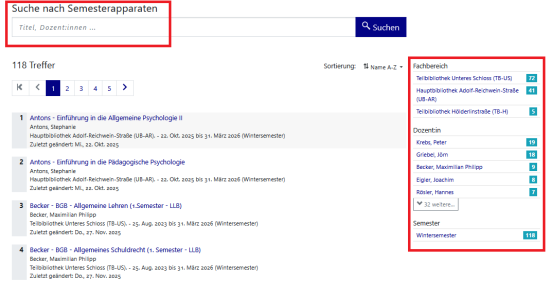
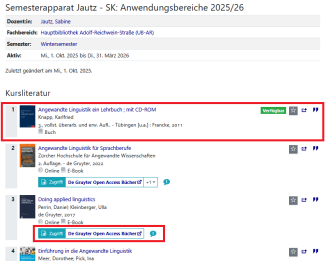
You will not find scans of essays here, they are still only available via Moodle but if they are from our collection, the shelfmark of the book/journal or the link to the e-resource is noted.
AND combination
If several search terms are entered in one field, an AND operation is automatically performed
Example: Entering medienerziehung medienpädagogik returns hits containing both search terms. These do not both have to appear in the title or subtitle, but they must appear in the title entry.
OR combination
Link the search terms with OR if you want to extend the search to increase the number of hits.
The character for linking with OR in the Katalog plus is | (the character is located on the keyboard on the >< key).
Example: Entering medienerziehung | medienpädagogik will return hits containing either medienerziehung or medienpädagogik or both words.
NOT combination
Link the search terms with NOT if you want to restrict the search, e.g. to exclude a very specific search term from the search.
The character for linking with NOT in the Katalog plus is - (whereby this is placed before the second search word without a space).
Example: Entering medienerziehung -medienpädagogik will return hits whose titles contain the term medienerziehung but not the term medienpädagogik.
There are search terms that generate a very large number of hits.
These hit lists can be improved with the help of various filter options (bar on the right of the screen or "Show filter" button). Here are some examples:
- you can use a slider to specify a particular publication period
- In the library catalog results list (the “Catalog” tab), you can filter between local holdings and online resources
- You can select specific document types using “Document Type” or “Source Type”
- Using “Keyword,” “Subject,” or “Topic,” you can further narrow down the search results by subject
- You can display only newly acquired or licensed titles (New Acquisitions)
- If you select individual filters from different filter categories, an “AND” operator is applied, so the number of results will be smaller
- If, on the other hand, you select multiple filters within a single filter category, an “OR” operator is automatically applied, which expands the search results.
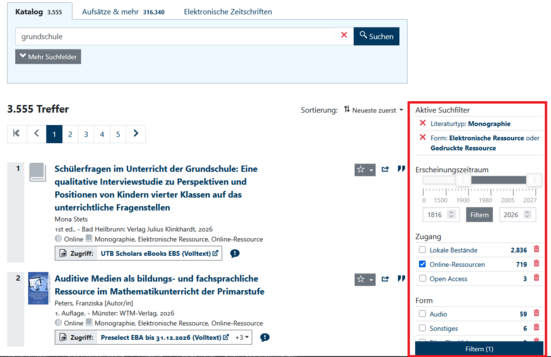
- IMPORTANT: After selecting the filters, the button "Refine" ("Filtern") has to be clicked; only then will the filters be activated.
- The set of results under “Articles and More” can (among other things) be optimized for specific content providers (such as specific databases or consortia).
Active search filters are displayed at the top of the sidebar or above the hit list.
A filter can be deleted again by clicking on the red X
.
The title can be saved in the favourites list using the star to the right of a hit, e.g. to export it later.

The favourites list created in this way can be accessed either via the "Account" menu item or via the star symbol in the main menu.
Up to 25 personal favourites lists can be created in the favourites list overview to sort tracks.
To do this, click on the blue plus sign below a hit in the favourites list and enter a name for the personal list.

As soon as at least one personal list has been defined, hits can also be assigned to the defined lists from the hit list. The personal favourites lists for the assignment can be selected or deselected via the drop-down menu next to the watch button of a hit:

In the favourites list, the display can be filtered according to specific lists.
The favourites list functions, such as export, also only work with the entries in the current selection when filtering. The favourites list function "Clear list", which appears when only one list is selected for display, removes all assignments to the selected list, thereby deleting it. However, the entries that were assigned to the list are not deleted from the entire watch list. To achieve this, the "Forget entries" function can be selected.

You can use the "Export list" function to send a list by email or save it in various formats, e.g. select the "BibTeX format" for export to Citavi or Zotero.


