


Libkey Nomad—Full text with just one click

LibKey Nomad is an AI-powered browser extension that indicates on numerous online platforms—such as Google Scholar, PubMed, Wikipedia, or on publisher and bookseller websites, indicating whether the full text of a journal article or an eBook is licensed for the University of Siegen or available via Open Access.
Clicking the blue icon below the reference takes you directly to the fastest available access via LibKey Nomad.
In addition, using data from “Retraction Watch,” LibKey flags retracted articles, thereby supporting the verification of the scientific integrity of publications.
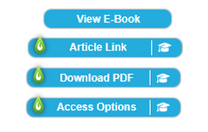
LibKey Nomad detects DOIs (articles) and eISBNs (e-books) on websites, compares them with the University Library’s licenses, and displays a button linking to the e-book or article.
In many cases, the full text of the article is linked directly, allowing you to download it.
If you are not using a computer on the University of Siegen campus or connected to the university network via VPN, you will often first be prompted to log in via Shibboleth using your ZIMT credentials to gain access to the full text.
If no licensed access is available, alternatives are offered, such as the option to place an interlibrary loan request.
Installation
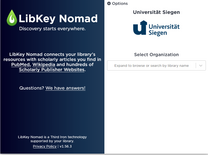
Click the link below to go directly to the download page for the LibKey browser extension for your favorite browser (choose from Chrome, Edge, Firefox, Brave, Vivaldi, and Safari).
When logging in, simply select “University of Siegen” once, and LibKey will be activated.
How It Works
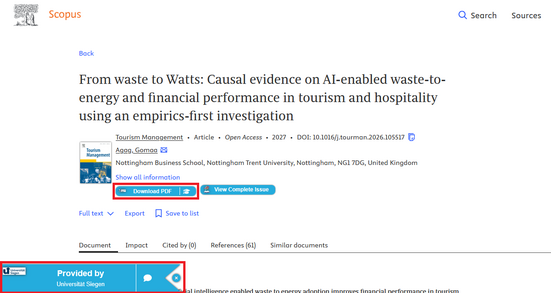
LibKey will now either display a pop-up in the lower-left corner of your browser or appear as a small button on the current website (e.g., in Scopus, Google Scholar, or even Wikipedia) if the literature citation contains a DOI or eISBN.
When you click on the pop-up or button, LibKey checks your access rights to the respective full text (i.e., you gain access to the licensed content of the Siegen University Library even without using Katalog Plus).
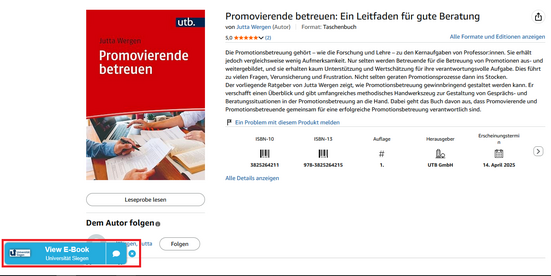
In addition, on selected websites (e.g., Amazon Germany), a notification appears if the Siegen University Library has a book you’re looking for available as an eBook.
Whenever possible, the link takes you directly to the eBook.
Libkey Nomad FAQs
LibKey Nomad helps you find full-text versions of scholarly articles more quickly. When you come across a title during an online search or in a database (e.g., in search results or a bibliography), LibKey Nomad takes care of the next step for you: It checks whether the full text of the article or the eBook is available to the University of Siegen and then directly displays relevant links for accessing the full text.
This saves you time, eliminates the need for lengthy searches for access options, and gets you to the texts you need for your studies or research more quickly.

With a single click, the PDF document opens in the browser or is downloaded (depending on the settings). If the computer is not on the University of Siegen network, you must first complete Shibboleth authentication or establish a VPN connection. The PDF document comes either directly from the publisher or is the publisher’s version (according to data from Unpaywall) that is stored in a repository such as PubMed Central, EuroPMC, or a university repository.

Similar to “Download PDF,” with the difference that the user is not shown a PDF file, but rather a web page that either contains the full text in HTML format or also provides the PDF—though an additional link is required to access it.

This icon means that Libkey Nomad did not find a direct link to the full text, but offers the option to start a search via the Siegen University Library’s link resolver (“"How do I get it?") to start a search that may find a full-text link or, for example, allow you to place an interlibrary loan request.

The article was found in a repository in the form of an accepted manuscript. Although the content has undergone a peer-review process, it is likely not yet prepared for publication and may not be available as a PDF document. Authentication is never required for these links.

The “View E-Book” icon indicates that the result found is not a journal article. When you click on the result, LibKey usually displays access options for the eBook (e.g., “Read online,” “Download PDF,” “Publisher platform,” or “Library link”). The specific availability (full text, chapter preview, download available or not) depends on the publisher’s license terms.

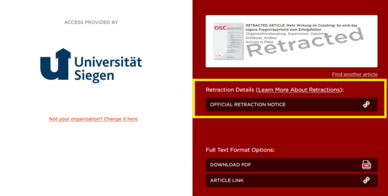
The “Article Retracted” icon indicates that the listed article has been “withdrawn.” This information is based on data from the publisher or Retractionwatch.com. In this way, LibKey Nomad makes an important contribution to verifying the scientific integrity of publications.
Libkey marks articles that have been officially retracted by the publisher for various reasons or are listed on RetractionWatch.com with a special icon:

Clicking the “Article Retracted” button takes you to a warning page that contains important information about the article’s retraction.
If LibKey Nomad does not display a link, it is usually because there is no unique identifier for the result (for example, in your system, no DOI for articles and/or no eISBN for books). You may find a DOI or eISBN in the full view of the result (if available), or at least other unique identifiers such as an ISBN, ISSN, or DOI-like strings (often the DOI or eISBN is missing only in the source, not in the work itself).
Searching by author, title, or other source details in Katalog Plus often leads to the desired result as well.
Our Tips for searching in Katalog plus offer assistance with this.
Anyone can install Libkey Nomad as a browser extension and select the University of Siegen as their home institution. However, access to full-text articles is only available from workstations within the university network. Members of the University of Siegen can also access the electronic resources from off-campus by establishing a VPN connection or logging in via Shibboleth.
The access credentials of library users who are not members of the university cannot be used to access licensed resources.
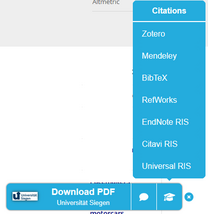
LibKey Nomad includes a module that allows you to export citations directly from within LibKey Nomad. When LibKey Nomad detects an article on the page, an additional option appears that allows you to export the article’s citation data in various citation styles; Citavi and Zotero are also available as styles.
Courses on reference management with Citavi or Zotero are held regularly, both in person and online.
No, the browser extension is currently only available for desktop PCs and laptops.
As an alternative, you can install the Abracademic browser extension, which is also available for mobile devices and can use Libkey links. The ID for the Libkey library that you need to set up Abracademic is: 4080.


