



UB@Home
Members of the University of Siegen can also access the electronic resources from off campus.
Students and academics can use licensed online databases and eJournals that are marked with a yellow traffic light in the eResources portal or in the EZB, as well as eBooks that have a full-text link in the catalog plus, from their home computer.
The license check is carried out via an IP check (after logging in via VPN) or by logging in via Shibboleth.
VPN
For members of the University of Siegen, the ZIMT (Center for Information and Media Technology) offers VPN software (Virtual Private Network) for access to the university network.
The software (for various operating systems), a description and a configuration file can be downloaded from the ZIMT.
The user data for the login are the ones of the university ZIMT account, which is also used for webmail or Moodle.
The software is available for various operating systems. Links and instructions are available at the ZIMT.
In order to be able to use databases or full texts of electronic media outside the university network, the device must be connected to the university via a VPN client. Only then will it be recognized as an authorized user and licensed e-resources can be accessed.
After installing eduVPN, a new icon should appear in the taskbar in the status area (system tray). The symbol may only be visible after 'expanding':

If this icon is not visible, the eduVPN service must be started manually by double-clicking on the eduVPN desktop icon.
To establish a connection, the desired profile must be selected in the application and activated by clicking on the slider.
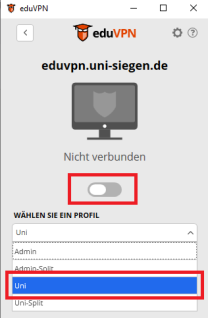
If necessary, a browser window will open with a login screen in which you can log in with your ZIMT account details (as with moodle or email). This must be confirmed by clicking on "Approve".
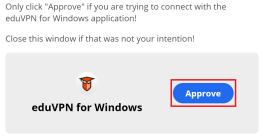
As this connection is now valid for approx. 1 week, the account details do not have to be entered for each connection.
If the slider in eduVPN window appears green, the connection is successful.
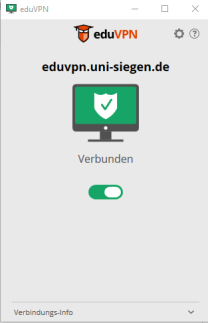
A successful connection is also visible in the status bar.

After installing OpenVPN, a new icon should have appeared in the taskbar in the status area (system tray). The icon may only be visible after 'expanding':

If this icon is not visible, the OpenVPN service must be started manually by clicking on the OpenVPN desktop icon.
Right-click on the OpenVPN icon in the status bar to start the connection with the desired VPN profile (uni or admin):
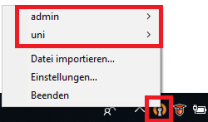
'Connect' can be selected in the submenu of the respective profile, then the ZIMT account data must be entered as the user name and password.
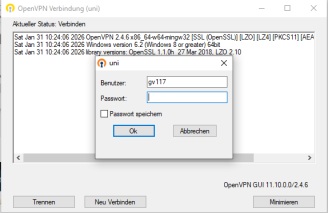
After successful login, the color of the OpenVPN icon changes to green:

To disconnect, the 'Disconnect' function is available in the submenu of the respective profile:
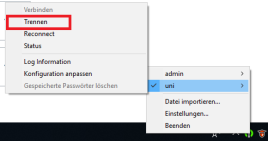
After successfully disconnecting, the color of the OpenVPN icon should have changed from green to orange again:
The eduVPN software is available for various operating systems, information and instructions are available from the ZIMT.
Questions about using the VPN client will be answered by the ZIMT support desk, questions about using the e-resources will be answered by the staff of the University Library.
Shibboleth
Shibboleth allows users to gain access to online services by authenticating themselves to their home organization (=University of Siegen) instead of authenticating themselves to the service provider, e.g. Katalog plus or an eBook provider.
The login name and password used for authentication is the same as for ZIMT services (email or Moodle), regardless of the end device and without the need to install additional software.
The databases, eBooks or electronic journals licensed by the University of Siegen Library are generally only accessible within the University of Siegen network. Use via VPN is also possible in most cases.
If an eBook needs to be accessed quickly on a smartphone or tablet, members of the University of Siegen can also authenticate themselves with many providers via Shibboleth without installing the VPN client. It is of course also possible to use Shibboleth on PCs or laptops.
The provider's website often contains phrases such as "Log in via Shibboleth or Athens", "Login via your institution", "Institutional Login". Sometimes these links are also hidden under the general "Login" link.
In most cases, you can then search for "Siegen" using a search function or select the University of Siegen from a drop-down menu.
The selection leads to the login mask of the University of Siegen, where the login with data of the ZIMT user account (e-mail, Moodle, ...).
After successful authentication, a second page is displayed listing the data to be transferred to the service. There you have to click on"Agree" again.
This consent is saved so that the intermediate step is no longer necessary later. However, consent can also be withdrawn later.
After logging in, you will be redirected to the provider's website, where the licensed e-resources are now accessible. As a rule, it is also indicated that access is via the license of Siegen University Library.
The provider's page often contains phrases such as "Log in via Shibboleth or Athens", "Login via your institution", "Institutional Login". Sometimes these links are also hidden under the general "Login" link.

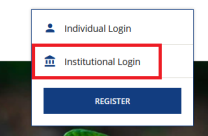
In most cases, you can then search for "Siegen" using a search function or select the University of Siegen from a drop-down menu.
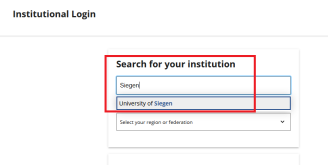
The selection leads to the login mask of the University of Siegen, where the login with data of the ZIMT user account (e-mail, Moodle, ...) can be carried out.
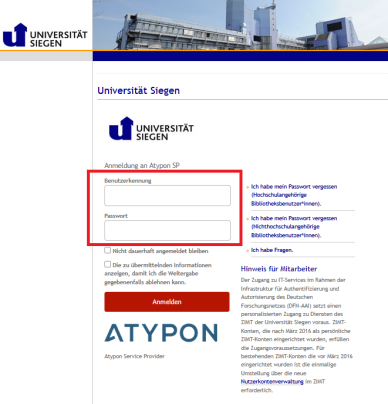
After successful authentication, a second page will be displayed listing the data to be transferred to the service. You must then click on"Agree" again.
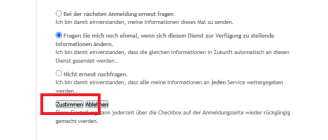
This consent is saved so that the intermediate step is no longer necessary later. However, consent can also be withdrawn later.
After logging in, you will be redirected to the provider's website, where the licensed e-resources are now accessible. As a rule, it is also indicated that access is via the license of Siegen University Library.

For this publishers and platforms authentication via Shibboleth is possible.
The list is updated regularly. Please report further publishers via eMail, which offer Shibboleth, but you are missing the University of Siegen.
- American Association for the Advancement of Science - AAAS
- American Chemical Society - ACS
- American Institute of Phycis - AIP
- American Physical Society - APS
- American Society of Civil Engineers - ASCE
- Annual Reviews
- Association for Computing Machinery - ACM
- ASME Digital Collection
- beck eLibrary
- Biblioscout
- Bloomsbury
- Brill Reference Works
- Brockhaus
- Cambridge University Press
- Content Select
- deGruyter
- Duke University Press
- Ebsco
- Elsevier
- Emerald
- Erich Schmidt Verlag
- Frankfurter Allgemeine Archiv
- Hanser eLibrary
- Hogrefe und Huber (PsyJournals)
- Hogrefe eBooks
- HÜF-NRW (eLearning-Bereich)
- IEEE
- Ingentaconnect
- Inlibra
- Intellect
- IOP - Insitute of Physics
- John Benjamins
- JSTOR
- Kohlhammer eLibrary
- Meiner eLibrary
- Mohr Siebeck
- Munzinger
- Musik in Geschichte und Gegenwart
- Narr Francke Attempo eLibrary
- Nature
- Optical Society of America (OSA)
- ProjectEuclid
- Project Muse
- Proquest
- Römpp
- Sage (Zeitschriften)
- Sage Knowlede (eBooks)
- Scifinder-N
- SIAM
- Springer
- Statista
- Taylor & Francis
- utb elibrary
- Vandenhoeck & Ruprecht eLibrary
- Wiley
- World Scientific Publishing
Questions about the use of Shibboleth or the password can be answered by the ZIMT support desk, questions about the use of the e-resources can be answered by the staff of the University Library.
FAQs - Frequently asked questions
eResources and UB@Home
No, unfortunately VPN and Shibboleth can only be provided for members of the University of Siegen. However, you can use the licensed e-resources free of charge at the PC workstations of the University Library.
Please consider whether you have already tried to access one of the publisher's eBooks before the VPN connection was established. If so, a cookie with an incorrect IP address may have been saved and you will therefore not be able to access it. Delete the cookies in your browser and try again.
Also check whether the VPN connection has been established correctly, see section "Testing the connection" on the ZIMT information page.
If you have problems with the VPN client, please contact the ZIMT support desk.
We have not yet set up login via Shibboleth for all publishers and platforms; a list of access points can be found via "Which providers or publishers are reachable via Shibboleth" and is updated regularly.
Please report further publishers via e-mail which offer Shibboleth, but you are missing the University of Siegen.
Yes, the data is transmitted in encrypted form using modern cryptographic algorithms and can only be decrypted by the respective communication partners.
Data is only transferred from the Identity Management System to other IT systems if the data protection requirements are met.
Compliance with data protection regulations is made considerably easier because data is only stored in one place and is only passed on from there in compliance with legal regulations.
If you search in the"Articles & more" section, you will get hits from many different databases, not all resources contained are licensed. Links "Zum Volltext" should take you to the full text of the resources; other links may work, but they do not have to. It is better to use the link "How do I get it" to check whether a resource is available online, is in the library collection or can be ordered via interlibrary loan.


