


Scan
We offer modern book scanners in the main library and the branch libraries. Ideal for academic works, large books or journals.
General information
- A total of ten modern scanners are available.
- Color, grayscale and black and white scans are possible.
- Storage formats: PDF, TIF and partly JPG.
- Scanning is free of charge. All you need is your own USB stick (FAT32 formatting) to save files.
Accessibility
- The Main Library AR has a low-barrier scanner (floor -1) with a touchscreen on the side for easier use.
All scanners at a glance
- Main Library AR: A total of 7 overhead scanners with book cradle and USB port, distributed on all floors.
- Branch Library H: 1 overhead scanner with book cradle and USB port on floor 4.
- Branch Library PB: 1 overhead scanner with book cradle and USB port on floor 0.
- Branch Library US: 1 overhead scanner with book cradle and USB port on floor 1 in room 110.
ScanTent
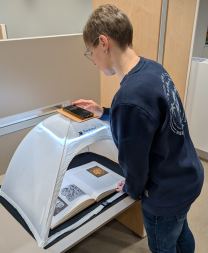
As an alternative to our overhead scanners, you can also use your own smartphone to scan literature at our scan tents. All you need is any scanning app. The scan tent can handle formats up to DIN A3 size. Use of the service is free of charge.
How does it work?
1) Open the app you want for scanning on your smartphone.
2) Place your smartphone in the holder on the “roof” of the tent.
3) Place the document you want to scan (book, journal, etc.) inside the tent.
4) Turn on the LED light bar for optimal lighting.
5) Let’s get started...
Where are the scan tents located?
Main Library AR, floor 0, in front of the Central Information Desk Branch Library US, floor 1, across from the “Fundamentals of Law” course reserve section
There are printing stations at all our library locations.
Our printers are directly connected to a corresponding PC.
General information
- A total of 5 printers are available.
- First, save everything on a USB stick (formatted FAT 32).
- The use of the printers is free of charge.
- Please bring your own paper.
You can also buy paper at the circulation desks (5 pages for €0.25).
Accessibility
- All printers are wheelchair accessible.
If you have any questions about functionality or technical faults, please contact the library staff.
All printers at a glance
- Main Library AR: Print and scan room on floor -1 plus print station on floor 1, building section D.
- Branch Library H: Print and scan room on floor 4.
- Branch Library PB: Print station on floor 0.
- Branch Library US: Print and scan room on floor 0.
Reader-Printer / Film-Scanner
The library's holdings include an extensive collection of documents on microfilm and microfiche. With a special reading and copying device (reader-printer/film scanner), these media can be used, scanned, and copied as files to a USB stick. Please bring your own USB stick (formatted to FAT 32).
The reader-printer/film scanner is located in the Main Library AR.
Please make an appointment in advance.
Service hours: Monday - Friday: 9:00 am - 5:00 pm
Contact: Mail ub-ar@ub.uni-siegen.de or phone 0271/740-4563

PC workstations
PC workstations with Internet access are available at all library locations and can be used free of charge for academic purposes.
- The following programs are available for use on the PCs
Firefox for accessing the Internet, including the Katalog plus, as well as the licensed databases, eBooks and eJournals - Adobe Acrobat Reader and other display programs for special file formats, e.g. PDF documents
- LibreOffice, contains programs for word processing (Writer), spreadsheets (Calc), presentations (Impress) and creating drawings (Draw), as well as a database management system (Base) and a formula editor (Math)
It is not possible to install additional programs!
Files from the Internet or edited documents from LibreOffice can be saved temporarily on drive D: Images, documents or downloads (local hard disk) or on a USB stick (drive E).
Cloud storage services, e.g. the university cloud Sciebo can also be used for storage.


